
Download Active Keylogger Home – Free, Secure, Background Keylogging Tool for Windows & Mac
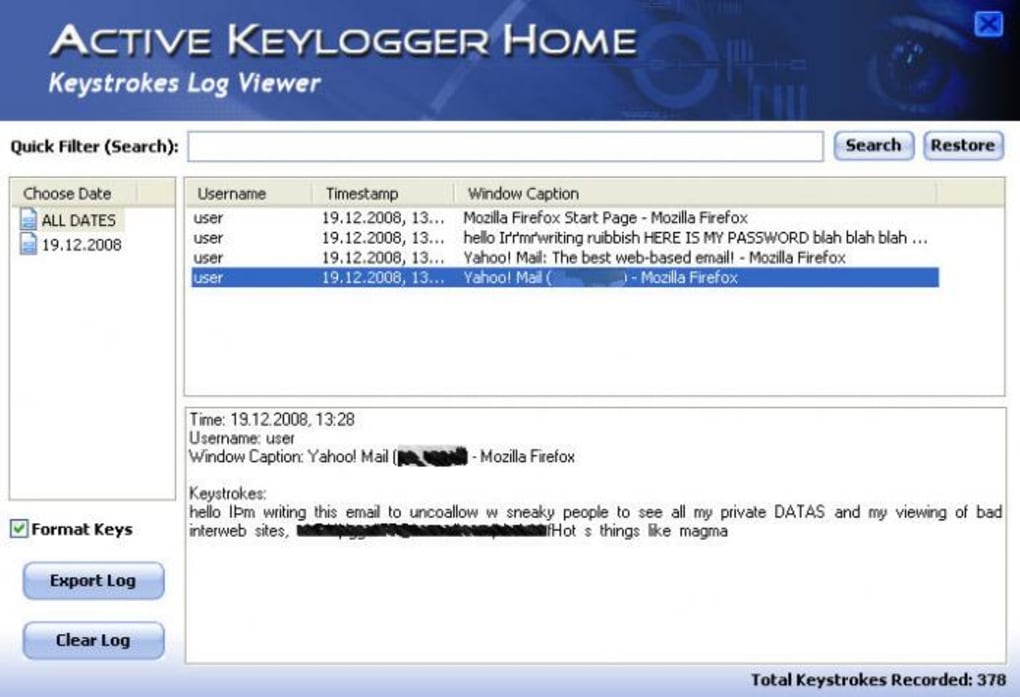
Active Keylogger Home is a powerful yet discreet software tool designed to monitor all keyboard activity and web browsing behavior on your personal computer. Whether you're a concerned parent, a vigilant homeowner, or someone who wants to ensure their devices aren’t being misused, this application offers a simple way to keep track of who’s using your PC. Running silently in the background, Active Keylogger Home captures every keystroke, including passwords, messages, and websites visited, storing the data in a structured format by date and time.
This makes it easy to review activity logs and identify suspicious behavior. With flexible email reporting options, you can receive daily or event-triggered summaries directly to your inbox—perfect for remote monitoring. The software is available for free, supports both Windows and Mac systems, and requires minimal setup.
While its interface may not be the most modern or polished, its core functionality remains reliable and effective. For users seeking a no-frills, functional keylogger that works without detection, Active Keylogger Home delivers on its promise. However, it’s important to use such tools responsibly and within legal boundaries.
Key Features of Active Keylogger Home
Active Keylogger Home comes packed with essential features that make it a go-to solution for discreet computer monitoring. One of its standout capabilities is background keylogging, which allows the software to run invisibly whenever the computer is powered on. This ensures continuous tracking without interruption, even when the user is unaware of its presence. The tool captures every keystroke typed on the keyboard, including sensitive data like login credentials, chat messages, and search queries. This level of detail is invaluable for parents who want to ensure their children aren’t accessing inappropriate content or for employers monitoring shared workstations.
Another major feature is web activity tracking. The software logs every website visited, including timestamps and URLs, giving you a clear picture of online behavior. These records are organized chronologically, making it simple to review when and where the computer was used.
For added convenience, Active Keylogger Home supports email reporting. You can configure the app to send automated reports at set intervals—such as daily or hourly—or trigger alerts every time the software is activated. This is especially useful for remote monitoring, allowing you to check in from work or while traveling.
The software also includes log file organization, with data stored by date and sorted by time. This structure helps users quickly locate specific events without sifting through massive logs. Additionally, the tool is lightweight and doesn’t consume significant system resources, ensuring it won’t slow down your computer. While the interface may feel outdated, the functionality remains robust. For those needing a free, reliable keylogger with minimal setup, Active Keylogger Home offers a solid balance between performance and simplicity.
Installation & Usage Instructions
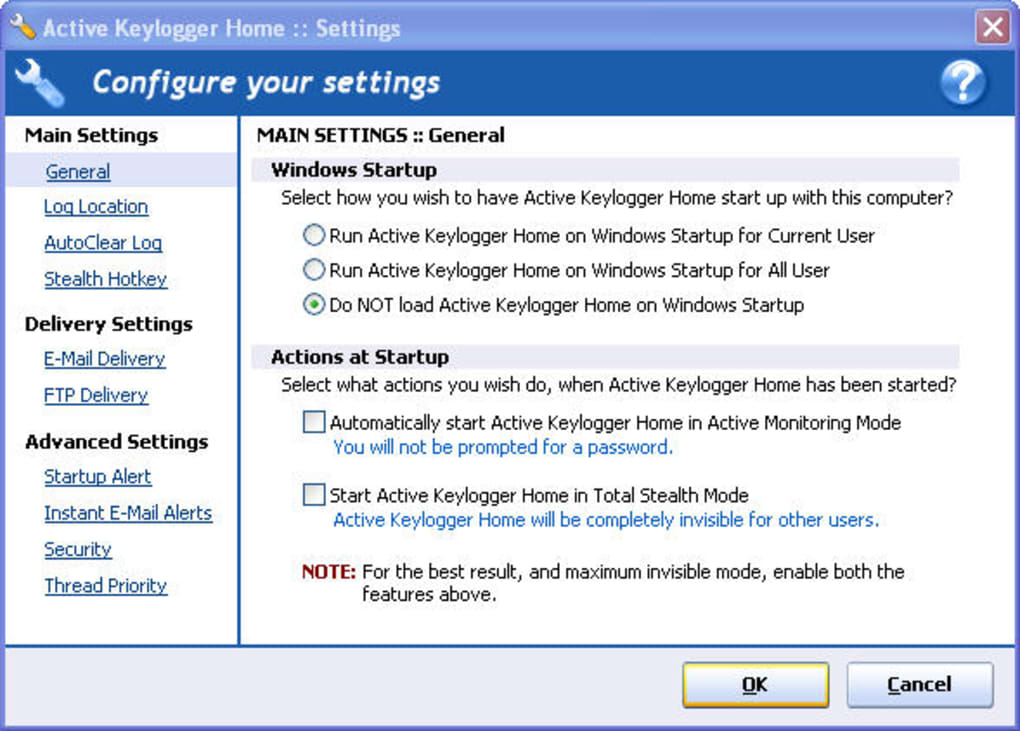
Installing Active Keylogger Home is straightforward and ideal for users with minimal technical experience. First, visit the official website and download the software for your operating system—either Windows or Mac. The installer is compact and completes the setup process in under a minute. Once installed, the application runs automatically at startup, ensuring it’s always active whenever the computer is turned on.
After installation, open the software and access the settings panel to customize your monitoring preferences. Here, you can enable or disable specific features such as keystroke logging, web history capture, and email reporting. To set up email alerts, enter your email address and configure the frequency—whether you want daily summaries, hourly updates, or instant notifications when the app starts. You can also specify the email server settings if you’re using a custom provider like Gmail or Outlook.
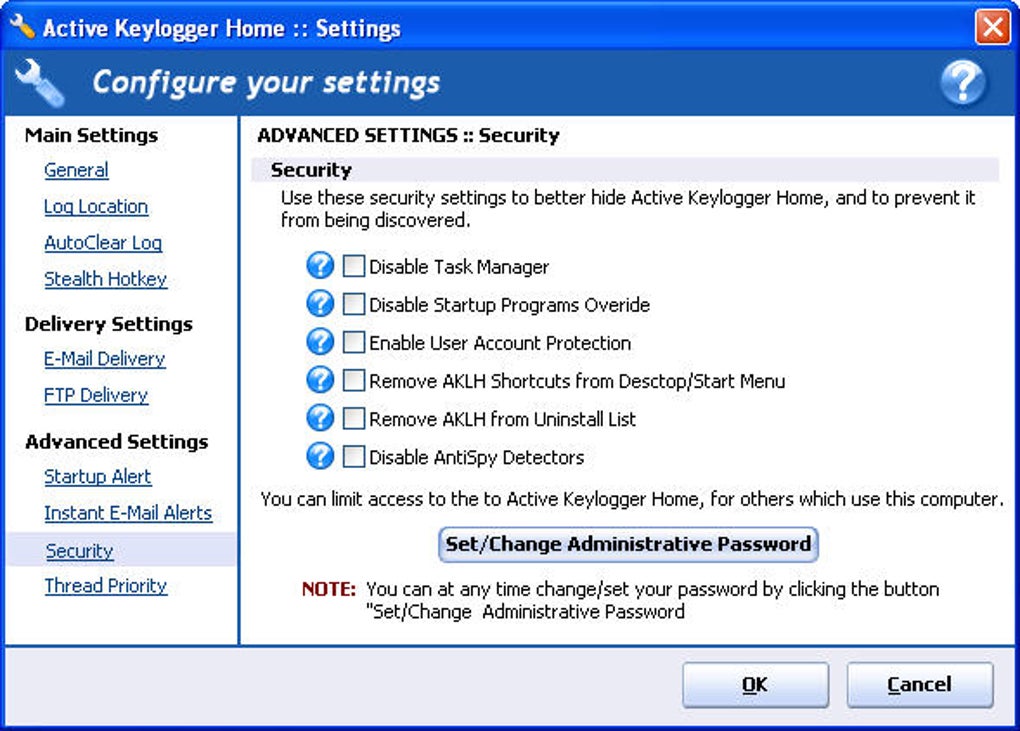
For maximum discretion, ensure the “Hide from Task Manager” and “Run at Startup” options are enabled. This ensures the software remains undetected during normal use. The logs are saved locally in encrypted format, but you can also export them to a secure folder or cloud drive for backup.
To view the logs, simply open the software’s dashboard, select the desired date range, and browse the recorded activity. The timeline view displays each action with a timestamp, making it easy to track user behavior. Remember to keep the software updated to maintain compatibility and security, especially after major OS updates.
Compatibility & System Requirements
Active Keylogger Home is designed to be compatible with a wide range of devices, making it accessible to most users. It supports Windows 7 and later versions, including Windows 10 and Windows 11, ensuring seamless integration with modern systems. On the Mac side, it works with macOS 10.12 (Sierra) and higher, covering the majority of Apple devices currently in use. This cross-platform support allows you to monitor multiple computers in a household or office from a single account.
The software is lightweight, requiring minimal system resources. It runs efficiently on machines with as little as 2GB of RAM and a dual-core processor, making it suitable for older or budget-friendly devices. It doesn’t rely on high-end graphics or extensive memory, so performance remains smooth even on low-end hardware. The installation process is simple and doesn’t require administrator privileges on most systems, although some security settings may prompt a confirmation dialog.
Active Keylogger Home does not require an internet connection to function, but it does need one to send email reports. If you're using a firewall or antivirus, ensure the software is added to the exception list to prevent interference. The app is fully compatible with standard input devices like keyboards, mice, and touchpads. It works with both wired and wireless peripherals, ensuring consistent logging regardless of the setup. For users managing multiple devices, the consistent behavior across platforms is a significant advantage.
Pros and Cons: Is Active Keylogger Home Right for You?
- Pros:
- Free to download and use with no hidden costs
- Runs silently in the background without detection
- Supports both Windows and Mac systems
- Tracks keystrokes, web history, and login details
- Flexible email reporting with customizable schedules
- Lightweight and low system impact
- Simple installation and setup process
- Cons:
- Interface is outdated and not very user-friendly
- Log reports are basic and lack visual formatting
- Not the most secure option; logs are stored locally
- May be detected by advanced antivirus software
- Limited customization options compared to premium tools
Frequently Asked Questions (FAQ)
- Is Active Keylogger Home legal to use?
- Yes, it is legal to use Active Keylogger Home on devices you own, such as your personal computer or family members' devices, provided you have their consent. However, monitoring someone without their knowledge may violate privacy laws in some regions, so always check local regulations before use.
- Can I use Active Keylogger Home on multiple computers?
- Yes, you can install and use Active Keylogger Home on multiple devices as long as they are under your ownership and control. Each installation works independently, and you can manage logs and reports separately for each machine.
- Does Active Keylogger Home work on Android or iOS devices?
- No, Active Keylogger Home is designed exclusively for Windows and Mac computers. It does not support Android or iOS mobile devices. For mobile monitoring, you’ll need a different tool specifically built for smartphones and tablets.
- How often can I receive email reports?
- You can set email reports to be sent daily, hourly, or triggered every time the software starts. This flexibility allows you to stay updated on computer usage without constant manual checks.
- Is my data secure with Active Keylogger Home?
- While the software stores logs locally and offers basic encryption, it is not the most secure option available. For maximum protection, store logs in a password-protected folder and avoid leaving them on public or shared drives. Regularly back up data and consider using additional security measures.
Final Verdict: Should You Download Active Keylogger Home?
Active Keylogger Home is a practical, no-cost solution for users who need to monitor computer activity discreetly. Its ability to record keystrokes, track web browsing, and send automated email reports makes it ideal for parents, homeowners, and individuals concerned about unauthorized access. While the interface may feel dated and the report formatting could be improved, the core functionality remains effective and reliable. The software is easy to install, runs quietly in the background, and supports both Windows and Mac systems.
That said, it’s crucial to use this tool ethically and legally. Always inform users if you’re monitoring shared devices, and avoid using it to spy on others without consent. For those seeking a free, functional keylogger with solid monitoring capabilities, Active Keylogger Home is worth downloading. With regular updates and a simple setup, it delivers consistent performance across different environments.
Download Active Keylogger Home today and take control of your digital security with a powerful, free monitoring tool designed for real-world needs.







